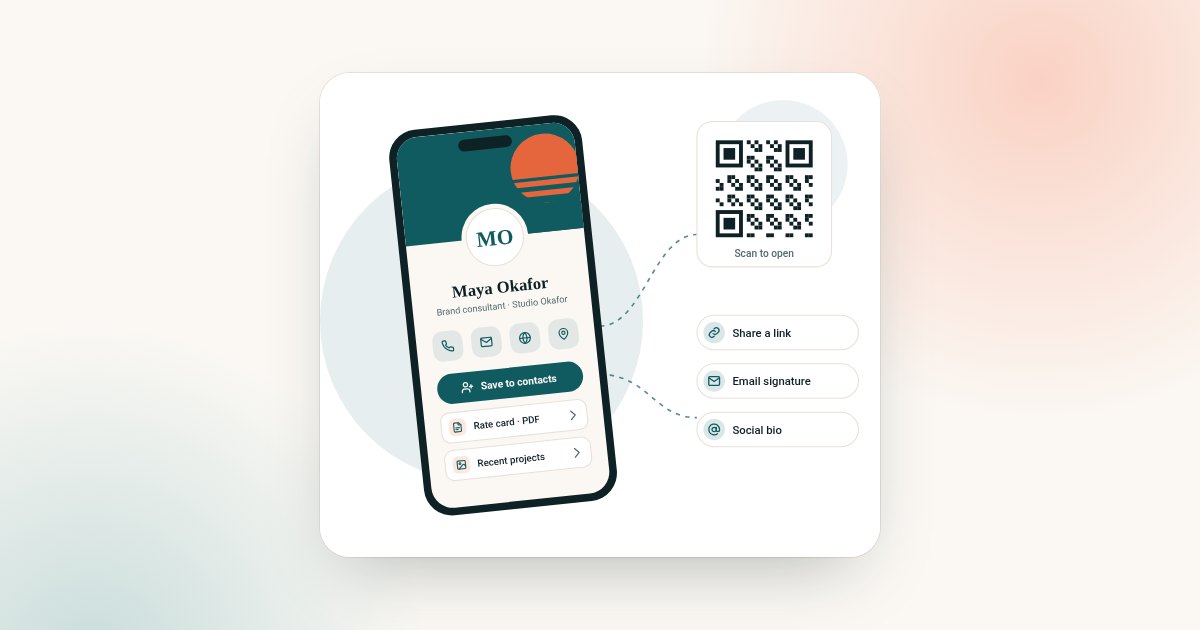
A solid 2026 digital business card checklist covers profile accuracy, mobile-first design, privacy compliance, sharing channels, and a plan for keeping details current. Working through each item below before you launch — or before your team rolls cards out at scale — helps you avoid the most common early mistakes.
Digital business cards have matured from a novelty into a standard networking tool for professionals worldwide, but that also means expectations have risen. A card that simply lists your name and number no longer stands out. This checklist walks through everything worth reviewing in 2026, whether you're setting up your first card or auditing an existing one for a distributed international team.
Profile essentials checklist
- [ ] Full name and current job title
- [ ] Company name and a one-line description of what you do
- [ ] Primary phone number with correct country code
- [ ] Professional email address
- [ ] Website or portfolio link
- [ ] Social profiles relevant to your work
- [ ] Professional headshot or logo (minimum 400x400px)
- [ ] A clear call-to-action (book a call, download a brochure, view your work)
Choosing the right card type for your team
Before finalising your setup, confirm which product fits your use case. An online business card suits people who mostly network digitally. A digital business card shared by QR code suits frequent in-person networkers and event attendees. A virtual business card suits remote-first teams that want a paperless rollout with zero physical logistics. Larger organisations often mix all three across different roles.
Design and usability checklist
Mobile-first layout
Most scans and link clicks happen on a phone. Preview your card on both a small and large screen before publishing, and confirm buttons are easy to press with one thumb.
Load speed
Compress images before uploading so your card loads quickly even on slower mobile connections, which matters especially at conferences with congested Wi-Fi and crowded cellular networks.
Link priority
Put your most important action first. If you want people to book a meeting, that button should appear above a general "visit website" link.
Accessibility
Use readable font sizes and sufficient colour contrast so your card is easy to read for all visitors, including those using accessibility settings on their device.
Privacy and compliance checklist
- [ ] Confirm what personal information is publicly visible versus hidden
- [ ] Check whether the platform explains its approach to GDPR (for EU/UK contacts) and CCPA (for California residents)
- [ ] Avoid publishing sensitive personal information (home address, personal ID numbers) on a public profile
- [ ] Review the provider's data retention and deletion policy
- [ ] If deploying for a team, confirm who can edit or remove an employee's profile after they leave the company
Data protection expectations continue to tighten globally, and a public-facing profile with contact details deserves the same scrutiny as any other customer-facing data collection point. If you're unsure how a provider handles this, check their about page or contact their support team directly before rolling cards out organisation-wide.
Budgeting checklist for international teams
| Consideration | What to check |
|---|---|
| Currency | Confirm pricing displays in your local currency (USD, EUR, GBP, AUD, CAD, etc.) |
| Plan structure | Understand what's included in a Brand Presence plan versus optional Business Add-ons |
| Time to go live | Your profile is set up online after checkout, with no logistics to plan around |
| Team scaling | Check per-seat or per-team pricing if rolling out beyond one person |
| Renewal terms | Confirm whether pricing is a one-time cost, annual subscription, or a mix of both |
Rollout checklist for teams
- Standardise a single template so every team member's card looks consistent.
- Centralise contact detail updates so departing employees' cards can be deactivated promptly.
- Set a shared style guide for photos, titles, and link order.
- Decide which share routes each role should use — link, QR code, email signature or social bio.
- Track which link types perform best (booking links, portfolio links, social links) and refine the template accordingly.
- Schedule a quarterly review to catch outdated titles, dead links, or old phone numbers.
Maintenance checklist: keeping your card current
A digital card's biggest advantage over a printed one is that it can be updated instantly — but only if you actually remember to update it. Set a recurring reminder every few months to check that your title, company details, and links are current, especially after a role change, a new product launch, or a change in contact information.
Launch-day checklist
- [ ] Test your card link on both iOS and Android devices
- [ ] Scan your own QR code with a second phone to confirm it opens correctly
- [ ] Add the link to your email signature
- [ ] Update your LinkedIn and other social bios with the new link
- [ ] Share the card at your next meeting, call, or event and note any feedback
- [ ] Revisit analytics (if available) after two to four weeks to see which links get the most engagement
Why checklists matter more in 2026
As digital business cards become a default expectation rather than a novelty, the bar for what counts as a professional profile keeps rising. Contacts are now used to scanning or clicking through to a polished, mobile-friendly page with working links and a clear photo — anything less can feel like a missed opportunity compared with a competitor's card. Running through a checklist before launch, and again periodically afterward, is a small investment that protects the first impression your card creates.
It's also worth remembering that a digital business card often outlives the event or meeting where it was first shared. A contact might revisit your link months later when they're finally ready to book a service or make an introduction, so keeping the underlying details accurate pays off well beyond the initial exchange.
Common pitfalls this checklist helps you avoid
Even well-intentioned setups can slip on a few recurring issues. Outdated job titles are the most frequent, especially after a promotion or a company move that never gets reflected on the card. Broken links are another common problem, often caused by a portfolio site being redesigned without updating the corresponding link on the card. Finally, cluttered cards with too many competing calls-to-action tend to underperform simple, focused ones — a visitor who doesn't know which button to click often clicks none at all.
Working through the checklist sections above in order — profile essentials, design, privacy, budgeting, rollout, and maintenance — should catch the majority of these issues before they affect a real introduction or sales conversation.
New to this? Start with how to make a digital business card, and use the checklist by profession to decide what goes on your profile.
Frequently asked questions
What's the single most important item on this checklist?
Accuracy of your core contact details — name, title, phone number, and email — matters more than any design choice, since an outdated or incorrect detail undermines the entire purpose of the card.
How often should I update my digital business card?
A quarterly review is a reasonable minimum, but you should also update it immediately after any role change, rebrand, or change in contact information.
Do I need separate cards for different countries I work in?
Not usually — a single card with an international phone format and multi-currency-aware links works well across countries, though some larger teams create regional variants for local phone numbers or languages.
Is a wallet pass necessary, or is a QR code enough in 2026?
A QR code alone is sufficient for most networking situations, since virtually all smartphones can scan it natively; a wallet pass is a convenience some providers offer on top. If you need one specifically, ask before you buy: Lets Connect describes Add to Wallet but does not say which plan includes it.
How do I stay compliant with privacy regulations across different countries?
Focus on transparency and control: make sure your provider lets you choose exactly what appears publicly, review their stated approach to frameworks like GDPR and CCPA, and avoid publishing unnecessary sensitive information.
Should every employee be on the same plan?
Not necessarily. Brand Presence covers the profile itself, while Business Add-ons adds lead and CRM tools such as Contact Leads, Card Scanner and Export, which matter most in client-facing or sales roles. Both are one-time payments, so you can mix them across a team.
What should I check before rolling this out to an entire team?
Confirm the plan structure (Brand Presence versus Business Add-ons), centralised management for updating or deactivating profiles, and a consistent template so the whole team presents a unified brand image.