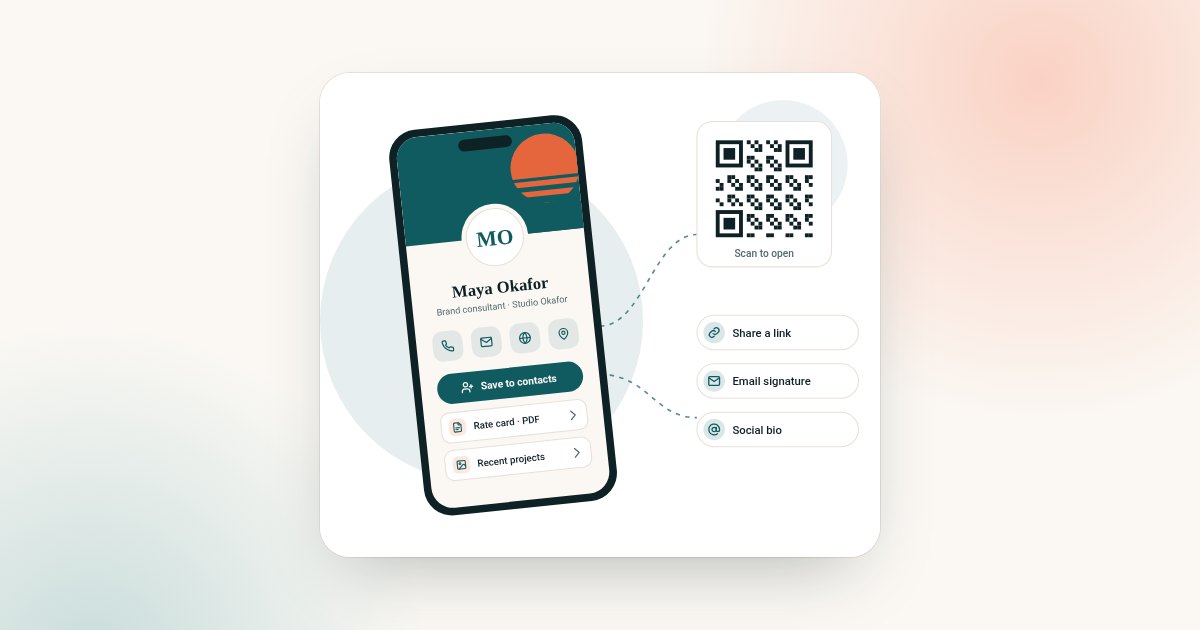
Online, digital and virtual business cards are all live web profiles shared by link or QR code, with no app needed. The difference is how you share: an online card suits remote link sharing, a digital card suits in-person scan-or-click moments, and a virtual card suits email signatures, video calls and hybrid teams.
If you've spent any time researching networking tools, you've probably noticed that "online business card", "digital business card", and "virtual business card" are used almost interchangeably across the internet. The overlap is real, but each term points to a different way of sharing. This guide breaks down what each term actually implies, where the subtle differences matter, and how to pick the right product for your situation, whether you're a freelancer in Toronto, a startup founder in Berlin, or a sales team spread across three continents.
Why the terminology gets confusing
Business cards moved online long before "digital business card" became a common search term. Early versions were simply a personal webpage with contact details — hence "online business card". As QR codes and wallet passes became mainstream, marketers began using "digital business card" to emphasise the smart, scan-or-click element. "Virtual business card" leaned into the idea that there's no physical object at all, appealing to remote-first teams and environmentally conscious professionals.
Today, the underlying technology is nearly identical across all three: a hosted profile page, a shareable link, a scannable QR code, and often a wallet pass that opens the same profile. The differences are mostly in emphasis and, sometimes, in the specific feature set a provider bundles under each name.
Online business card: the web-first approach
An online business card is best understood as a personal or company profile hosted at a unique URL. You share that link via a shareable link, QR code, email signature, or social bio. There's no physical object involved at all, which makes this option attractive for people who mostly network over video calls or across borders.
Because it's fundamentally a web page, an online business card tends to be the easiest to update. Change your job title, phone number, or portfolio link, and everyone who has ever scanned your code sees the new version instantly — no reprinting, no re-issuing.
Digital business card: the smart, scan-or-click experience
A digital business card is aimed at the in-person moment. You show your QR code or send your link, and the other person scans or clicks to land on your profile in seconds, with no app required on their end.
This category is popular with sales teams, consultants, and anyone who attends a lot of in-person events, trade shows, or conferences across different countries. The scan-or-click moment tends to feel more memorable than simply reading out a link, and it works whether the other person's phone is set to English, Spanish, French, or German.
Virtual business card: the app-free, borderless option
"Virtual business card" is often used to reassure people that nothing physical is required at all — ideal for fully remote professionals or companies standardising on a paperless process globally. A virtual business card typically emphasises instant setup, easy sharing over messaging apps, and update-anywhere flexibility, without needing anyone to install a dedicated app.
For international teams, this matters more than it might first appear: because everything is digital, a distributed workforce can roll out a consistent brand presence on day one, with no customs delays or regional logistics to plan around.
Comparing the three at a glance
| Feature | Online business card | Digital business card | Virtual business card |
|---|---|---|---|
| Main way to share | A permanent link | QR code scanned in person | Email signature and video calls |
| Best for | Web-first sharing, portfolios | In-person networking, events | Remote-first teams, instant rollout |
| Update after publishing | Instant | Instant | Instant |
| Cross-border friction | None | None | None |
| Typical setup time | Minutes | Minutes | Minutes |
| App required for recipient | No | No | No |
How pricing typically works internationally
Most providers price digital business card plans in a base currency and then display equivalent pricing in local currencies (USD, EUR, GBP, AUD, CAD, and more) at checkout, so you shouldn't need to do manual conversions. Because every format is entirely digital, your profile is set up online after checkout — there's nothing to wait for and nothing that needs to be produced or sent to you.
When comparing quotes, look at what's bundled into the plan. Under our own structure, a Brand Presence plan generally covers the hosted profile, design, and sharing tools, while Business Add-ons cover extras like team management, analytics, or additional integrations. Understanding this split helps you compare like-for-like rather than being swayed by headline price alone.
Privacy and data protection considerations
Because your profile holds personal contact information, it's worth checking how a provider handles data privacy — particularly if you or your recipients are based in the European Union, the UK, California, or another jurisdiction with specific rules. Reputable providers should be able to explain, in plain language, how they comply with frameworks such as the GDPR (General Data Protection Regulation) for EU/UK users and the CCPA (California Consumer Privacy Act) for California residents. At minimum, you should be able to control what information appears on your public profile and remove or update it at any time. Read a provider's about page and privacy policy before committing, especially if you're rolling this out across an organisation with staff in multiple countries.
Which one should you actually choose?
If most of your networking happens digitally — over email, LinkedIn, or video calls — an online business card is usually sufficient and the fastest to set up. If you attend conferences, client meetings, or trade shows in person and want a faster handover, a digital business card shared by QR code is the stronger fit. If your priority is a fully paperless, instantly deployable option for a distributed team, a virtual business card removes every physical-item variable entirely.
Many people, in practice, end up wanting a bit of all three: a shareable link for digital contexts, a QR code for in-person moments, and the flexibility to update everything centrally. The good news is that the underlying technology overlaps enough that you're rarely locked into just one approach — on this site the same two plans and the same features, including QR code sharing and a profile link you can add to your email signature, come with all three.
If you are ready to build one, follow our step-by-step guide on how to make a digital business card, then read how to share it on WhatsApp, LinkedIn and email.
Frequently asked questions
Is a digital business card the same as a virtual business card?
They overlap significantly. Both remove the need for a printed card and app installation, but "digital" usually describes sharing in person with a scan or click, while "virtual" describes sharing remotely through email signatures, video calls and messages.
Do I need a smartphone to use any of these?
Recipients generally just need a modern smartphone with a camera capable of scanning a QR code, or the ability to click a link — both are standard on nearly all phones sold internationally over the last several years. As the card owner, you'll manage your profile through a simple web dashboard.
Can I use these cards outside my home country?
Yes. Because the profile is hosted online, it works anywhere with internet access, and many storefronts show prices in local currency; in some markets the price is available on request.
How quickly is my card ready after I buy it?
Because everything is digital, your profile is set up online after checkout, so you can start sharing it by link, QR code, email signature or social bio straight away.
Will my personal data be protected under GDPR or CCPA?
Reputable providers structure their data handling to align with major privacy frameworks like the GDPR and CCPA, giving you control over what's published and the ability to update or remove information. Always check the specific privacy policy of the provider you choose.
Can I switch between online, digital, and virtual formats later?
In most cases, yes — since all three are built on the same underlying hosted profile technology, you can change how you share it later — link, QR code or email signature — without starting over.
Which option is cheaper?
On this site all three pages sell the same two plans at the same price, so the choice is about how you plan to share rather than cost.